

Codex vs Gemini vs Claude Code: A RealTest Workflow Comparison for Systematic Traders
I Used 3 AI Agents to Build, Optimize, and Walk-Forward Test a Strategy

Hey Trader!
If you have tried using AI for trading research, you know the trap.
The first AI answer can look amazing.
Then you spend the next hour:
fixing syntax
waiting the AI reponse
checking the rule logic
struggling with AI hallucination
pointing the agent back to the right data
rerunning the backtest
etc.
So I gave Codex, Gemini, and Claude Code the same job:
Create the strategy, run the base backtest, optimize the moving-average settings, run a walk-forward test, and produce charts I could review.
Which one wins? Let’s find out.

Same task, same data, same budget
I used the normal $20 plan for each tool. Agents were:
OpenAI Codex, using GPT-5.5
Gemini 3.1 Pro
Claude Code, using Opus 4.7
Each agent worked in the same local RealTest environment and received the same trading idea.
The strategy was a very simple:
Trade SPY only.
Buy when the 20-day moving average crosses above the 50-day moving average.
Only buy when SPY is above the 200-day moving average.
Exit when the 50-day moving average crosses back above the 20-day moving average.
I did not choose this because it is a special edge. I chose it because a simple strategy makes the comparison cleaner.

What each AI had to complete
The first job was the base backtest. The agent had to create a RealTest script, use the local SPY data, run the test, and produce the first equity curve.
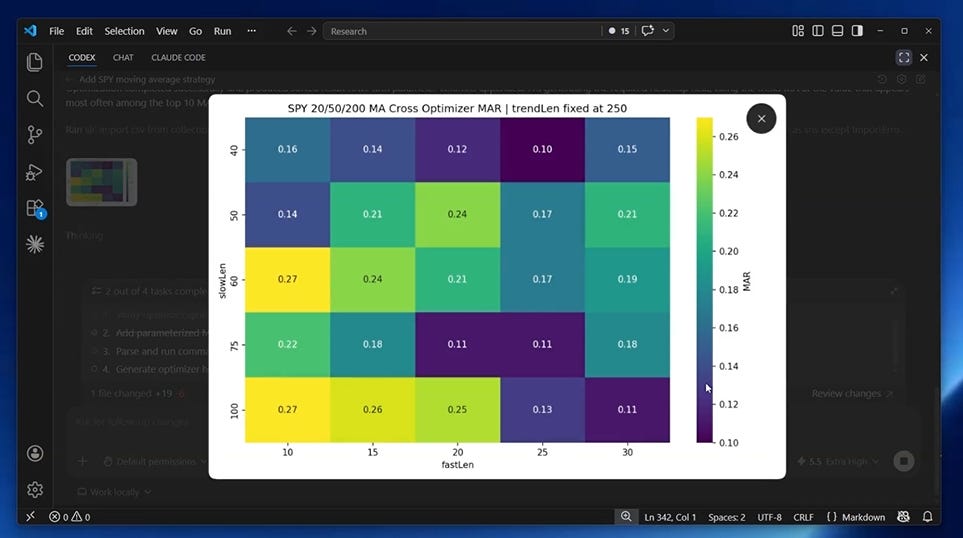
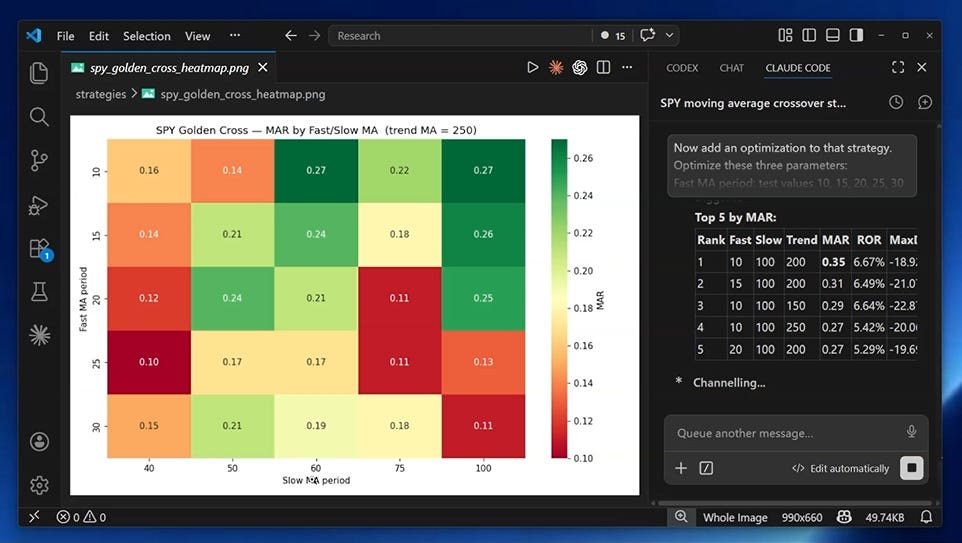
The second job was optimization. I did not want the agent to assume 20, 50, and 200 were automatically the best settings. I wanted a grid of moving-average combinations and a heatmap showing the shape of the result.
Because a single best MAR number can fool you. If good results only appear in one tiny corner, the strategy may be fragile. If nearby settings also work, the idea is easier to keep researching.
The third job was walk-forward testing. The agent had to optimize on one historical window, then apply the selected parameters to later data.
The exact prompts I gave them
Promp 1:
Write a RealTest strategy for SPY only.
Buy SPY when the 20-day moving average crosses above the 50-day moving average, but only when the close is already above the 200-day moving average.
Go all-in with 100% of capital, this is a single-position strategy, always either fully in or fully out.
Exit when the 50-day moving average crosses back above the 20-day moving average (death cross).
Long side only.
Test from 2000 to 2026.
Use DataFile:    spy.rtd to import SPY symbol
Prompt 2:
Now add an optimization to that strategy. Optimize these three parameters:
Fast MA period: test values 10, 15, 20, 25, 30
Slow MA period: test values 40, 50, 60, 75, 100
Trend filter MA period: test values 150, 200, 250
Skip any combination where the fast MA period is greater than or equal to the slow MA period — those are invalid. Run the optimization from the command line without any dialogs.
Show the results in a 2d matrix heatmap plots (use MAR).
Prompt 3:
Now set up a walk-forward optimization on that same strategy.
Use a 3-year in-sample window, stepping forward 1 year at a time, measured in years.
Keep only the single best parameter combination per window.
Run it in two steps from the command line: first the optimizer pass, then a separate backtest pass that uses the walk-forward results.
The backtest results should show both in-sample and out-of-sample rows so we can compare them.
Show the results in an ISS + OOS plot. 
Codex
First, I gave my first prompt to Codex.
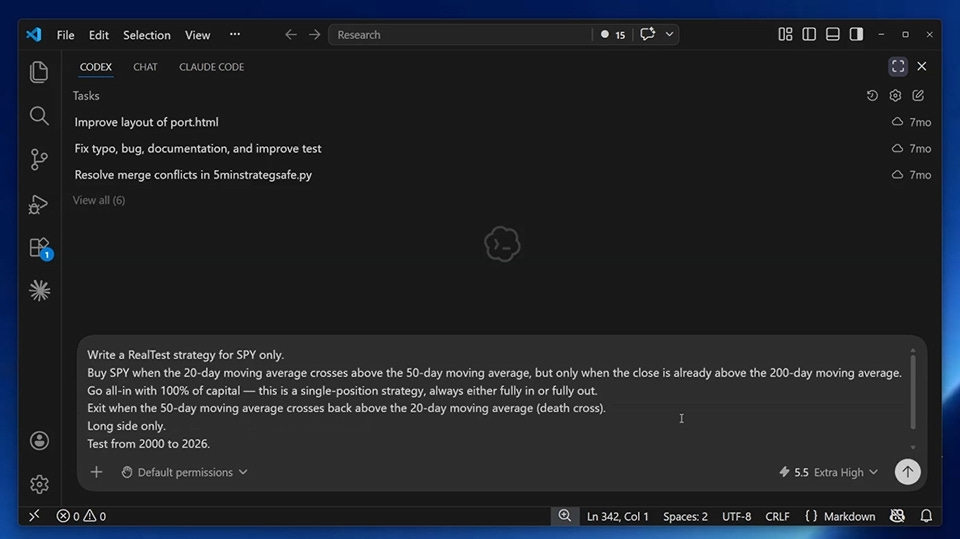
Codex started by inspecting the local project and checking the data source before writing the strategy file.
It imported SPY from Norgate data, ran the base backtest, and produced an equity curve.
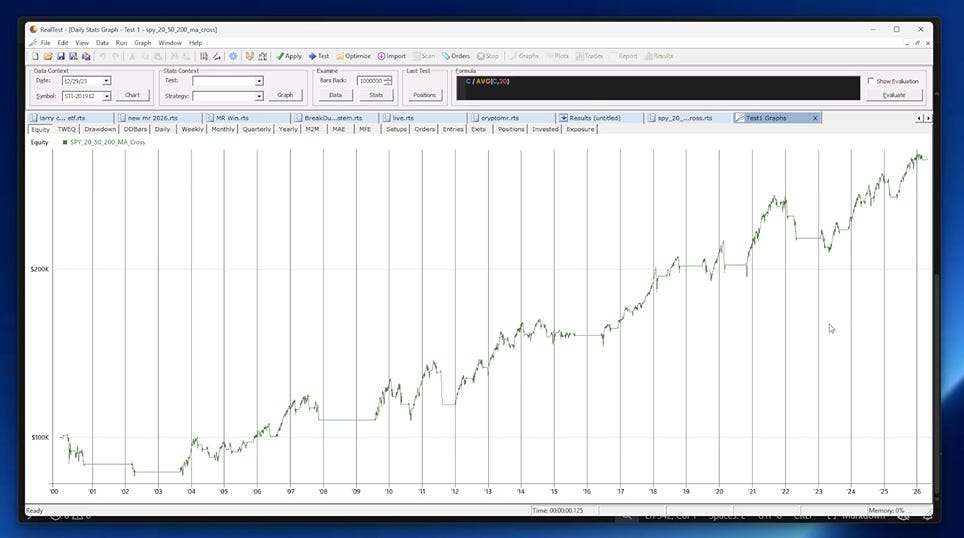
I still opened the result in my own RealTest setup. The agent can write and run the script, but the trader has to confirm the test matches the intended rules.
For the optimizer, Codex built the moving-average grid, ran the command-line optimization, and generated a heatmap.
It also created the walk-forward version and produced a chart comparing in-sample and out-of-sample equity curves.
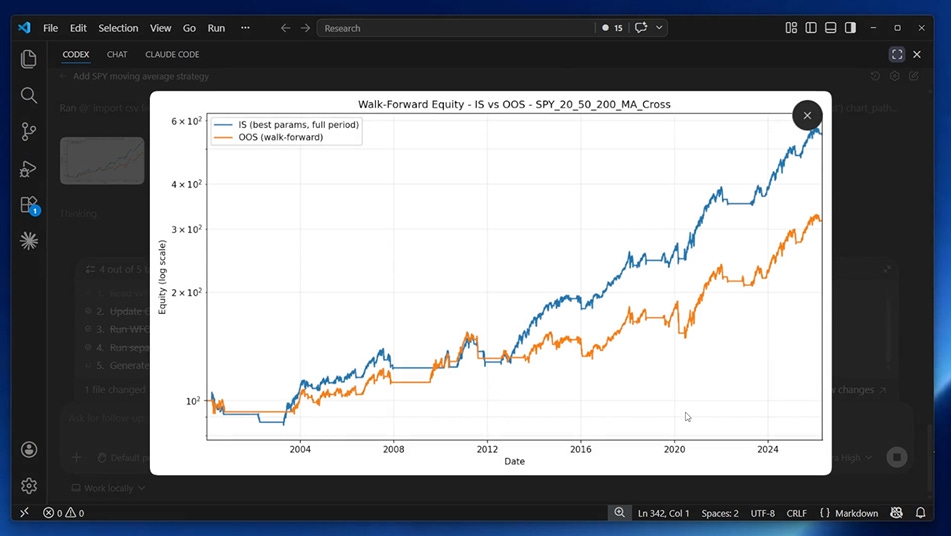
Overall, Codex did a very good job and completed every task.

Gemini
Next, I wanted to test Gemini. I had heard that some RealTest users also use Gemini models. How good is it compared to others? Let’s find out.
Gemini worked through the same RealTest environment inside Antigravity.
It inspected the local files, generated the strategy script, ran the base backtest, and produced the first equity curve.
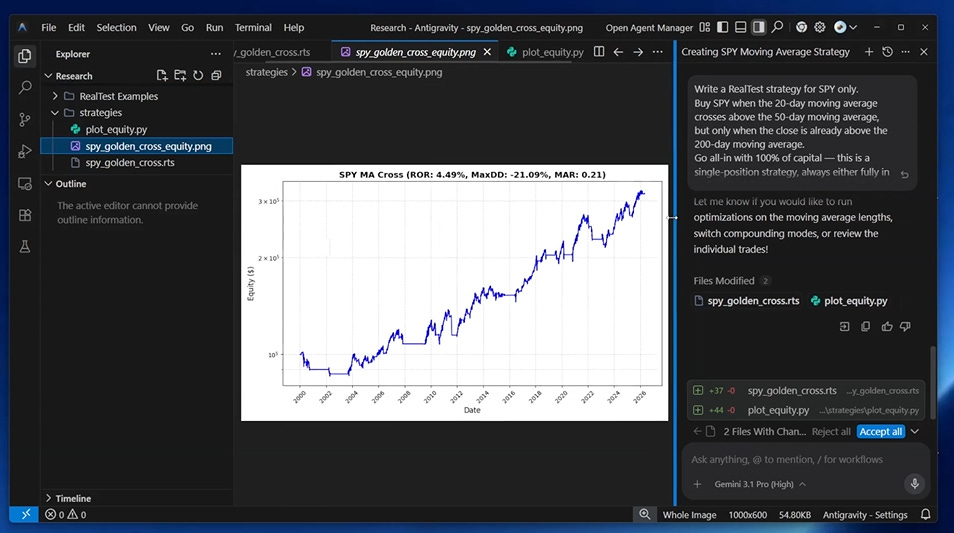
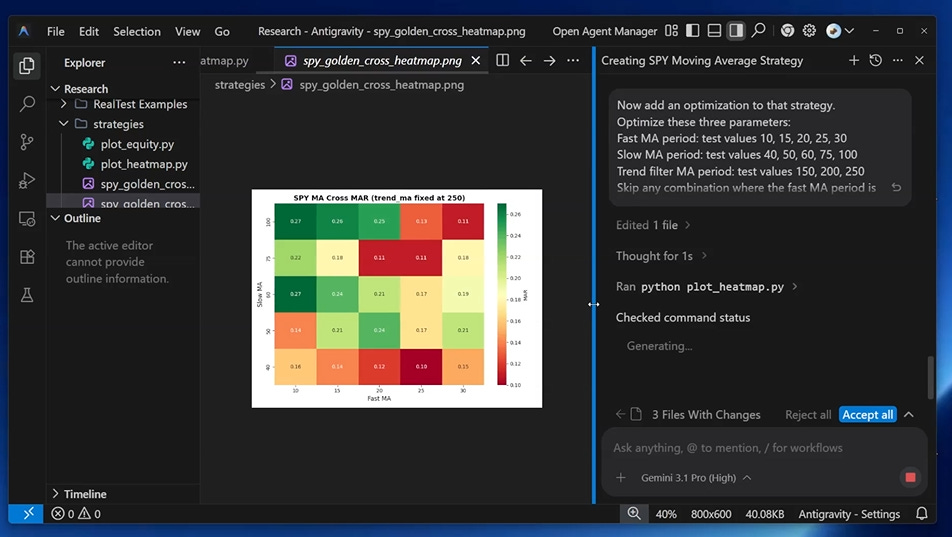
The useful detail in Gemini’s optimization pass was that it respected the moving-average constraint: the fast average has to be shorter than the slow average.
That sounds obvious, but it matters. An optimizer chart is not useful if the grid includes invalid strategy logic.
Gemini tested fast averages, slow averages, and the long-term trend filter, then produced the heatmap.
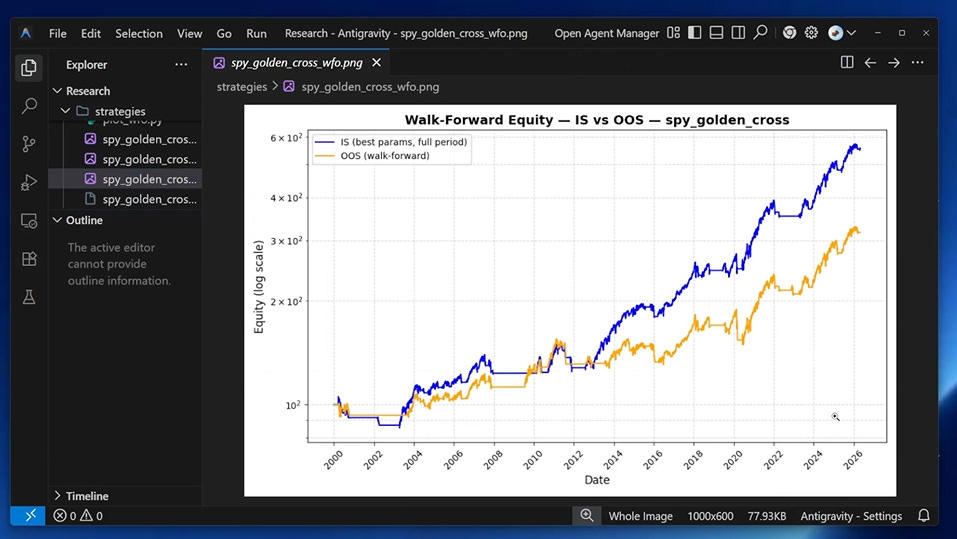
Gemini also ran the walk-forward test. The out-of-sample curve was lower than the in-sample curve.

Claude Code
Next, the test is Claude Code. Claude is probably the most well-known AI coding agent.
Claude Code handled the same sequence with the least hand-holding.
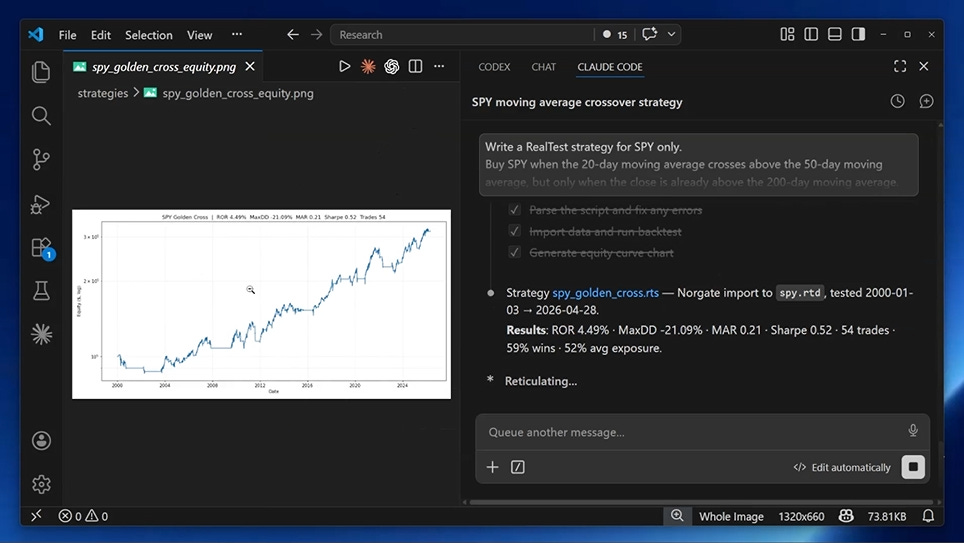
It read the files, imported the data, ran the base backtest, and generated the first equity curve. I checked the result inside RealTest, and the base test worked.
Then it used my existing optimization flow, ran the parameter grid, and created a heatmap comparable to the other agents.
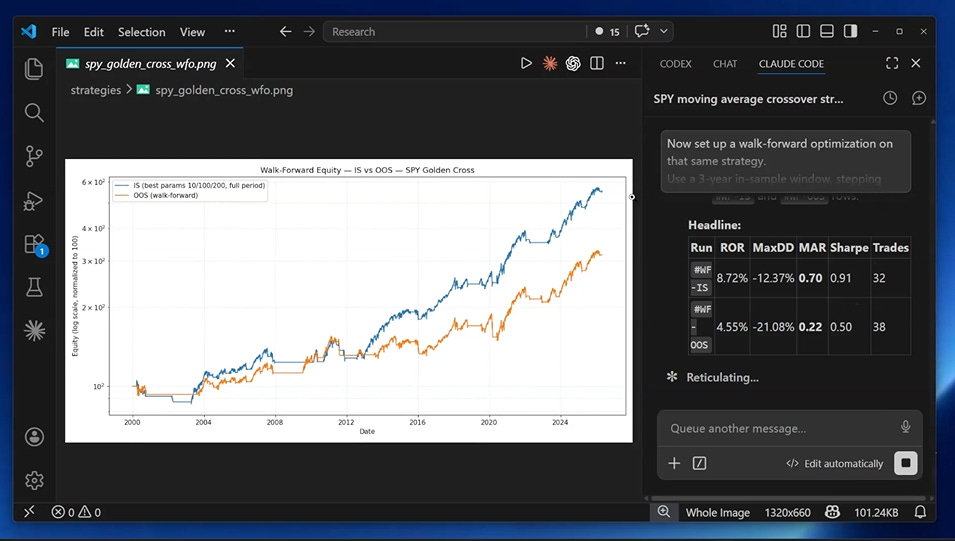
The walk-forward step was the hardest part of the comparison because it was not just “write a script.”
Claude Code had to write rolling parameter selections into the script, run the optimizer pass, and then run a separate backtest pass using those selected parameters.
It produced the final chart showing the difference between optimized in-sample performance and out-of-sample performance.

All three worked. One was better?
All three agents worked.
This was not a demo where two tools failed and one tool looked heroic.
Codex did the base backtest, optimization, and walk-forward test.
Gemini did the base backtest, optimization, and walk-forward test.
Claude Code did the base backtest, optimization, and walk-forward test.
The difference was how much time it takes.
In this RealTest setup, Claude Code felt faster, steadier, and easier to keep inside the research process. It needed fewer reminders and fewer manual pushes (because I’m not allowing AI to do everything on my computer).
Claude Code was my winner for this test.
And second and third place are tied between Gemini and Codex.
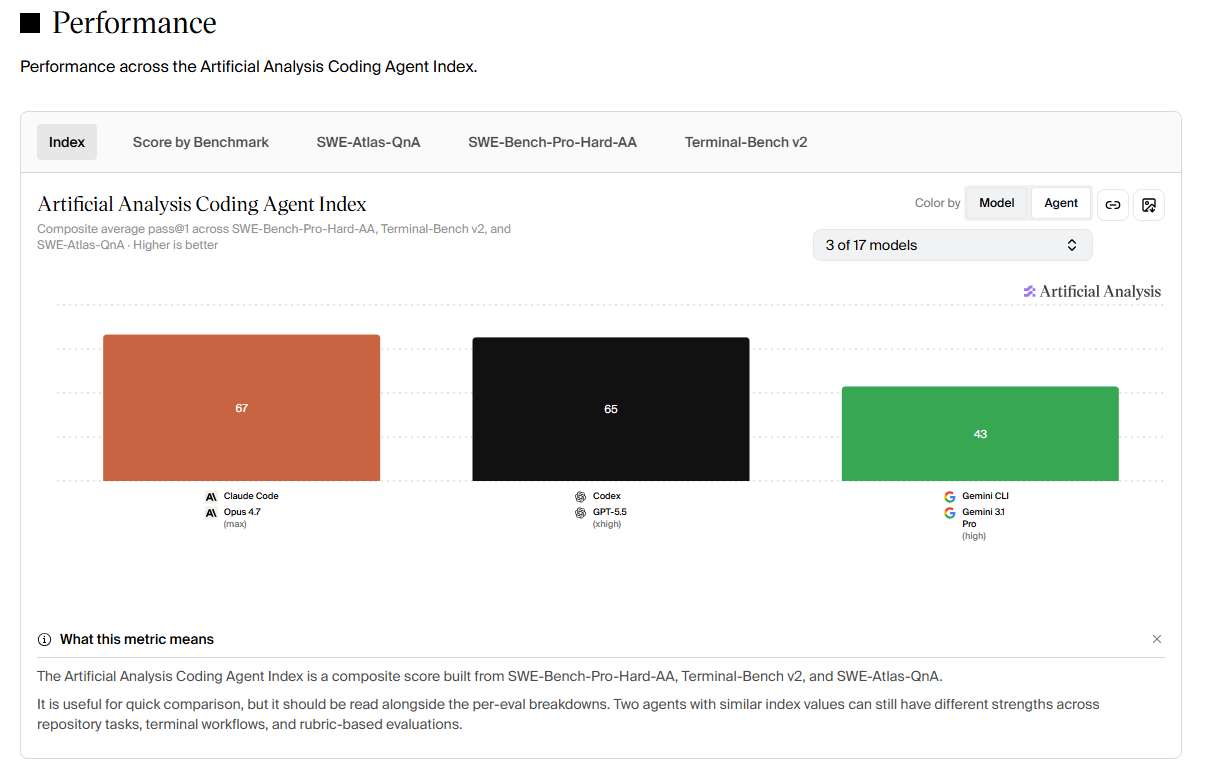
I also checked how the models I used rank across different performance benchmarks. Claude Code comes out on top, followed by Codex in second place and Gemini in third. You can check the rankings here if you’re interested.
My conclusion is this:
For this RealTest research task, Claude Code got me from idea to inspectable output with the least hand-holding.

Do not treat this as a permanent ranking
This was one strategy, one environment, and one workflow.
Model versions change. Tooling changes. Local file structure, permissions, data paths, and personal research habits all change the result.
So I would not treat this as a permanent ranking of AI tools.
I would treat it as a practical example of how to judge them.
Systematic traders should not look for a brand to believe in. We should look for a process we can inspect.

The real problem is starting from zero
The most annoying part of using AI for RealTest is starting from zero every session.
The agent does not know your folder structure. It does not know how you import data. It does not know which RealTest syntax mistakes it made last time. It does not know how you prefer to run backtests, optimizations, charts, and reports.
So the first part of the session becomes setup work.
You explain the same things. You correct the same assumptions. You remind it what RealTest expects. You push it back toward the research process you actually use. You waste so much tokens. And tokens = money.
That is why I built the new SetupAlpha course around Claude Code and RealTest.
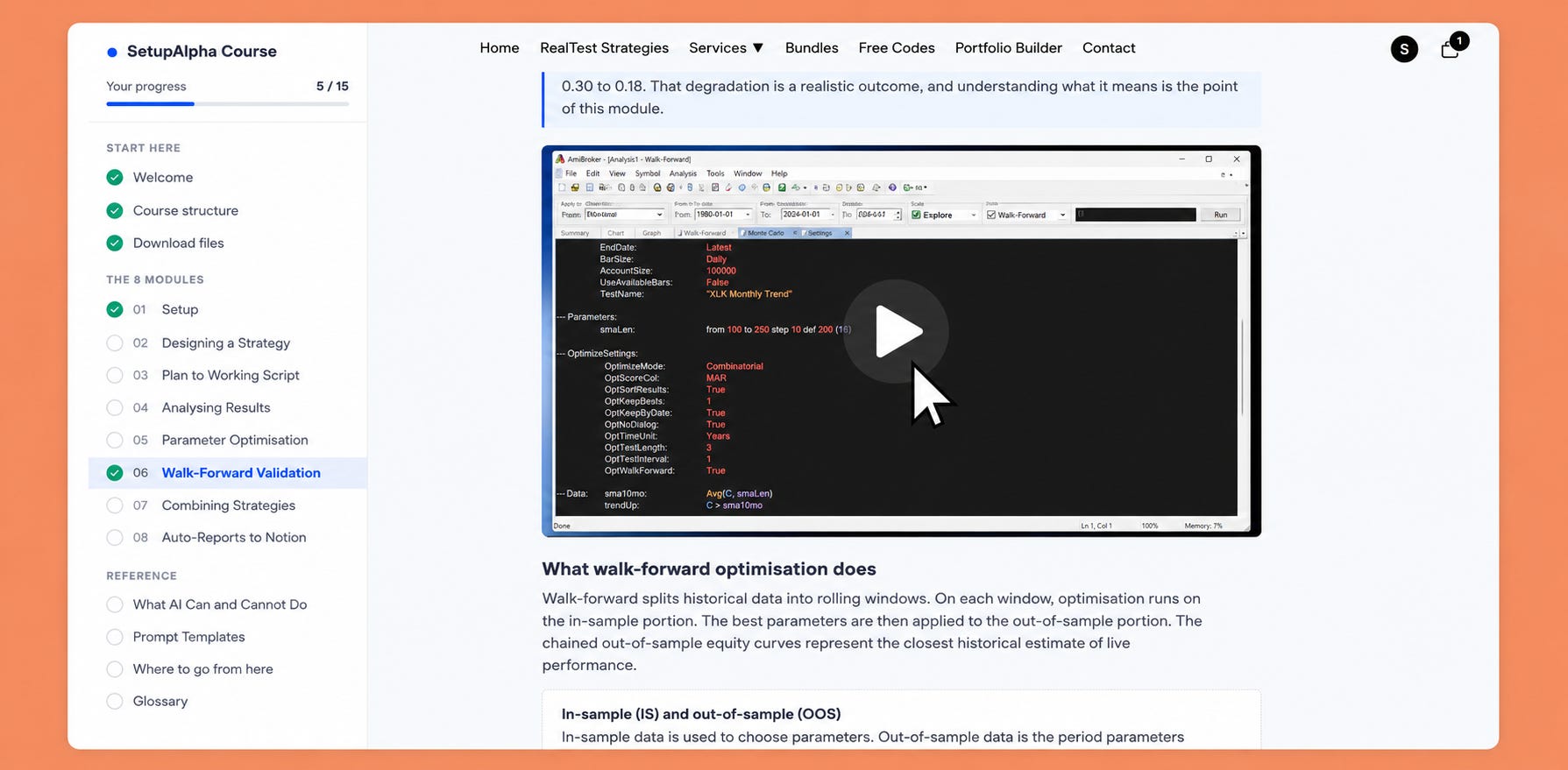
The course is not based on the idea that AI makes 100% win-rate strategies. It is built around a narrower, more useful idea:
If the files, prompts, workflow, and RealTest structure are set up properly, Claude Code can help you plan a strategy, write the script, fix errors, run the backtest, create charts, and organize the research result.
That saves time. A lot of time.
More importantly, it helps more ideas reach the point where they can be judged.
You can start a research task, let the agent work through the mechanical parts, then come back and inspect what was tested, what failed, what passed, and whether the strategy deserves another round.
That is the right role for AI in systematic trading research.
Not replacing judgment.
Getting more ideas to evidence.
If you have tried using AI with RealTest before and felt like it wasted more time than it saved, this workflow was built for that exact problem.
Check out the course here

Bottom line
AI can write a trading strategy.
That is no longer the interesting question.
But the better question is whether it can help complete a research process that a serious/professional trader would respect.
See you next week!